bopomofo / Zhuyin keyboard
The Zhuyin keyboard
On a Zhuyin keyboard, each key types one Bopomofo symbol. You type the sounds of a syllable, then its tone, and the computer offers the matching Chinese characters.

The standard layout
Almost every Zhuyin keyboard uses the standard layout, also called Dachen (大千). The symbols run down the columns of the keyboard in chart order: ㄅㄆㄇㄈ go down the first column, ㄉㄊㄋㄌ down the second. Focus the map and type on your own keyboard, or press its keys.
Keys su3cl3
ㄋㄧˇㄏㄠˇ
The tone keys
A syllable ends with its tone key. The tone key also tells the computer that the syllable is complete.
| Key | Tone | Mark |
|---|---|---|
| Space | Tone 1 | no mark |
| 6 | Tone 2 | ˊ |
| 3 | Tone 3 | ˇ |
| 4 | Tone 4 | ˋ |
| 7 | Neutral tone | ˙ |
How to type 你好
- Switch to your Zhuyin keyboard (see the setup steps below).
- Type s u 3. That is ㄋ ㄧ ˇ, the syllable nǐ.
- Type c l 3. That is ㄏ ㄠ ˇ, the syllable hǎo.
- The keyboard shows 你好. If it picked the wrong character, move to it and choose another one.
- Press Enter to confirm the text.
The keyboard picks characters from the whole phrase, so type a few syllables before you correct anything. If you do not know a symbol yet, learn it on the Bopomofo chart.
Add a Zhuyin keyboard
Windows 10 and 11
- Open Settings, then Time & language, then Language & region.
- Add the language Chinese (Traditional, Taiwan). It includes Microsoft Bopomofo.
- Press Win + Space to switch keyboards. Shift switches between Chinese and English.
macOS
- Open System Settings, then Keyboard, then Text Input, and select Edit.
- Add an input source: Chinese, Traditional, then Zhuyin.
- Switch with the Globe key or Control + Space.
iPhone and iPad
- Open Settings, then General, then Keyboard, then Keyboards.
- Select Add New Keyboard, then Chinese, Traditional, then Zhuyin.
- Press the globe key on the keyboard to switch.
Android
- Install or open Gboard, then open its Settings and Languages.
- Add Chinese (Traditional, Taiwan) and select the Zhuyin layout.
- Press the globe key, or hold the space bar, to switch.
The menu names change a little between system versions.
On a real keyboard
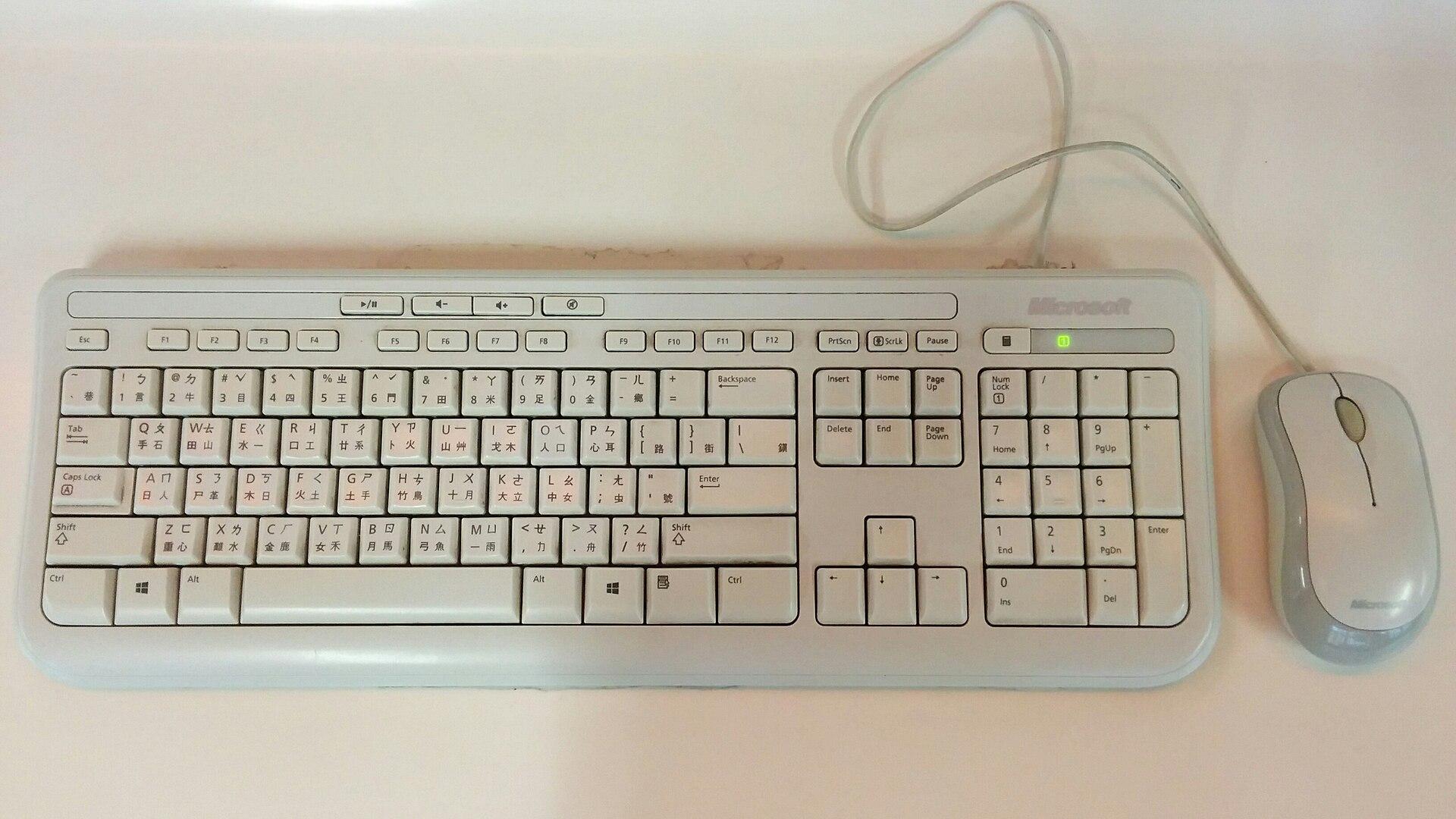
Other layouts exist, such as Eten (倚天) and Hsu (許氏). They put the symbols on different keys. Start with the standard layout: it matches the printed keys.
Learn it with Bobo.
bopomofo teaches the 37 symbols with MOE audio, writing in stroke order, listening drills, and speaking practice with tone feedback. It is free and open source.